

Every conversation. One intelligent hub.
CarePro brings customer and lead conversations into one unified inbox. Alex, your AI Communications Officer, uses the approved knowledge in your bstarAI Store to understand each message, respond automatically, prepare private drafts, or escalate the conversation to your team.
CarePro access is included with bstarOne Pro. No additional subscription or monthly retainer.
Connect your communication channels to one shared inbox powered by the same business intelligence.
Additional communication-channel integrations are in development.
Who CarePro Is Built For
CarePro helps businesses respond consistently as conversation volume grows, while preserving human oversight for important, sensitive, and high-value interactions.

Local Businesses
Bring website, email, WhatsApp, and social inquiries into one place. Give customers consistent answers while keeping appointment requests, sales questions, and service conversations visible to your team.

Consultants, Creators & Solopreneurs
Let Alex handle repeat questions and prepare context-aware replies while you focus on client work, content, delivery, and the conversations that benefit most from your personal attention.

Ecommerce & B2B Teams
Handle product questions, policies, order inquiries, sales responses, and supporting documents from one shared communication hub, with clear escalation when a team member should take over.

Startups & Growing Teams
Establish a consistent communication process before volume becomes difficult to manage. Use automation for routine interactions and preserve team time for product, partnership, sales, and customer-success conversations.
One intelligent communication hub
CarePro connects your inboxes with Alex, your AI Communications Officer. Alex uses approved business knowledge from your bstarAI Store to understand context, prepare or send relevant replies, and identify conversations that need a person.
Unify → Understand → Reply → Escalate
Stage 1 — Unified Inbox
-
✓
Connected Conversations — Bring Email, WhatsApp, Instagram, LinkedIn, Line, and Website Chat into one communication workspace.
-
✓
Shared Visibility — Monitor customer and lead interactions without switching between separate channel inboxes.
-
✓
Human Control — A team member can open, assign, review, and take over a conversation whenever needed.
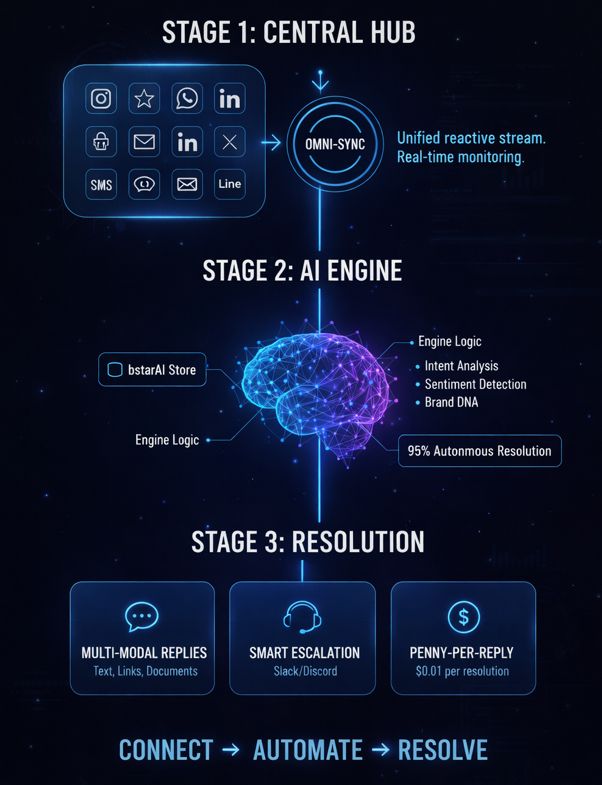
Stage 2 & 3 — Alex Resolves
-
✓
Context & Intent — Alex evaluates the message, available conversation history, intent, and sentiment before responding.
-
✓
bstarAI Store — Alex uses your approved products, services, policies, FAQs, links, and business knowledge.
-
✓
Multi-Modal Replies — Responses can include relevant text, links, and documents when the channel and conversation support them.
-
✓
Smart Escalation — Alex flags conversations that require human judgment, personal attention, or information it cannot confirm.
Choose the right balance between AI and human control.
Your deployed CarePro inbox starts ready for immediate testing with automatic email replies. As you expand the system, you can select the response mode that fits each workflow and channel.
Auto Mode
Alex sends responses automatically using the approved information available in your bstarAI Store and the context of the conversation.
Your initial CarePro email inbox is deployed in a test-ready configuration. Send a test email to the generated address and Alex can respond within approximately 1–2 minutes.
Semi-Auto Mode
Alex prepares the response as a private draft for your review. A team member can verify, edit, and send the final reply.
Use Semi-Auto when you want AI assistance while maintaining approval over the final message. Setup guidance is available in the CarePro documentation.
Manual & Escalation
Your team handles the conversation directly from the unified inbox. Alex can flag messages that need personal attention or human judgment.
Ideal for sensitive cases, complex disputes, high-value opportunities, or conversations where a personal relationship matters most.
LeadSalesPro → CarePro
A seamless hand-off when a lead replies
CarePro is the destination for replies generated by LeadSalesPro Pulse campaigns. The transition from automated engagement to a real conversation happens without forcing your team to reconstruct the lead’s journey.
- ✓ The lead responds to an active Pulse campaign.
- ✓ The active outreach sequence pauses to avoid unnecessary follow-ups.
- ✓ The conversation moves into CarePro with its available engagement context.
- ✓ Alex or a team member continues the conversation from the unified inbox.
Keep the context when the conversation becomes real.
LeadSalesPro creates the engagement journey. CarePro receives the response. Together, they give your team a connected path from initial outreach to qualification, support, follow-up, and relationship management.
Pulse Pauses
Automated outreach stops after a reply.
Context Moves
Available engagement history follows the lead.
CarePro Takes Over
Alex or your team continues the conversation.
From Blueprint to a test-ready CarePro inbox.
Your personalized Business OS deployment creates the initial CarePro experience for you, so you can test Alex before connecting additional communication channels.


STEP 01
Get Your Business OS Blueprint
Enter your website and business email. We review your public business footprint and identify practical opportunities across customer communication, lead handling, content, visibility, workflows, reporting, and operating control.
Your Starting Point
- • Review your customer communication footprint
- • Identify service and response opportunities
- • Choose self-deployment or guided setup
STEP 02
Deploy & Test Your CarePro Inbox
When your personalized Business OS is deployed, the system creates a CarePro email inbox powered by Alex. Log in, send a message to your generated email address, and test the automatic response experience immediately.
Ready When You Log In
- • Generated CarePro email address
- • Automatic replies powered by Alex
- • Test response typically within 1–2 minutes
- • Connect additional channels when ready
Commonly asked questions
Everything you need to know about CarePro, Alex, connected channels, human oversight, and the bstarAI Store.
Yes. CarePro access is included with bstarOne Pro. There is no additional CarePro subscription or monthly retainer. Usage-based AI replies and other supported actions consume bstarCredits only when you use them.
Your deployed Business OS includes a ready-to-use CarePro email inbox powered by Alex, your AI Communications Officer. You receive a generated email address that you can test immediately. Send it a test message, and Alex can return an automatic response within approximately 1–2 minutes.
CarePro currently supports Email, WhatsApp, Instagram, LinkedIn, Line, and Website Chat. These conversations can be managed through the unified inbox. Additional channel integrations are in development.
Alex uses the approved business knowledge in your bstarAI Store, including products, services, policies, FAQs, links, and supporting documents. It combines this information with the current message and available conversation history to prepare the most relevant supported response.
Yes. CarePro supports Semi-Auto Mode, where Alex prepares a private draft for a team member to review, edit, and send. Auto Mode can send supported replies automatically, while Manual Mode allows your team to manage the conversation directly. Configuration guidance is available in the documentation.
Alex can escalate a conversation when the available business knowledge does not support a reliable response or when the interaction requires human judgment. A team member can then review the conversation, take ownership, and respond personally from the unified inbox.
When a lead responds to a LeadSalesPro Pulse campaign, the active outreach sequence pauses. The conversation moves into CarePro with its available engagement context, where Alex or a team member can continue the interaction without unnecessary automated follow-ups.
Your bstarAI Store is private to your account, and your proprietary business data is not used to train public AI models. For additional information about data handling, privacy, and platform controls, review the bstarOne security, compliance, and legal documentation.
See what your customer-care system could handle and automate.
Enter your website and business email to receive a personalised bstarOne OS Blueprint. Discover practical opportunities across customer communication, lead handling, content, workflows, reporting, and operating control.
Deploy your Business OS and receive a test-ready CarePro email inbox powered by Alex.
Unify
Your Inboxes
Alex
AI Communications
Escalate
Human When Needed
bstarOne Smart Solutions for your business
The Integrated Business Operating System