

Your all-in-one engine for smart content creation.
CreativePro connects market intelligence, your bstarAI Store, and clear creative instructions to produce audience-aware social content, website articles, product media, service explainers, and digital-twin videos—then prepares everything for review and publishing.
CreativePro access is included with bstarOne Pro. No additional subscription or monthly retainer.
Create channel-ready video and branded content using the intelligence and business context already built into your Business OS.

Stop managing isolated content tasks.
Start operating a connected system.
CreativePro aligns intelligence, business knowledge, creative direction, production, review, and publishing so your brand can create consistently without rebuilding the process for every channel.
-
Intelligence-led: StartPro MarketPulse data helps keep content relevant to real audiences and market opportunities.
-
Business-aware: Your bstarAI Store supplies your brand, offers, assets, knowledge, and approved business context.
-
Reviewable: Publishing workflows include a default 24-hour review window so you can edit, approve, or reschedule.
-
Usage-based: CreativePro is included with bstarOne Pro, and bstarCredits are used only for the actions you run.
The system in action
Explore examples of the product media, videos, digital-twin scenes, social content, and visual explainers CreativePro can produce.



Premium Product Sets
Turn source product photos into coordinated, campaign-ready visual collections.
Dynamic Video Sets
Coordinated short-form video assets for product launches, campaigns, and social publishing.
Presence Twin Scenes
Create branded presenter videos using appearance and voice assets you provide or are authorized to use.
Easy Social Flows
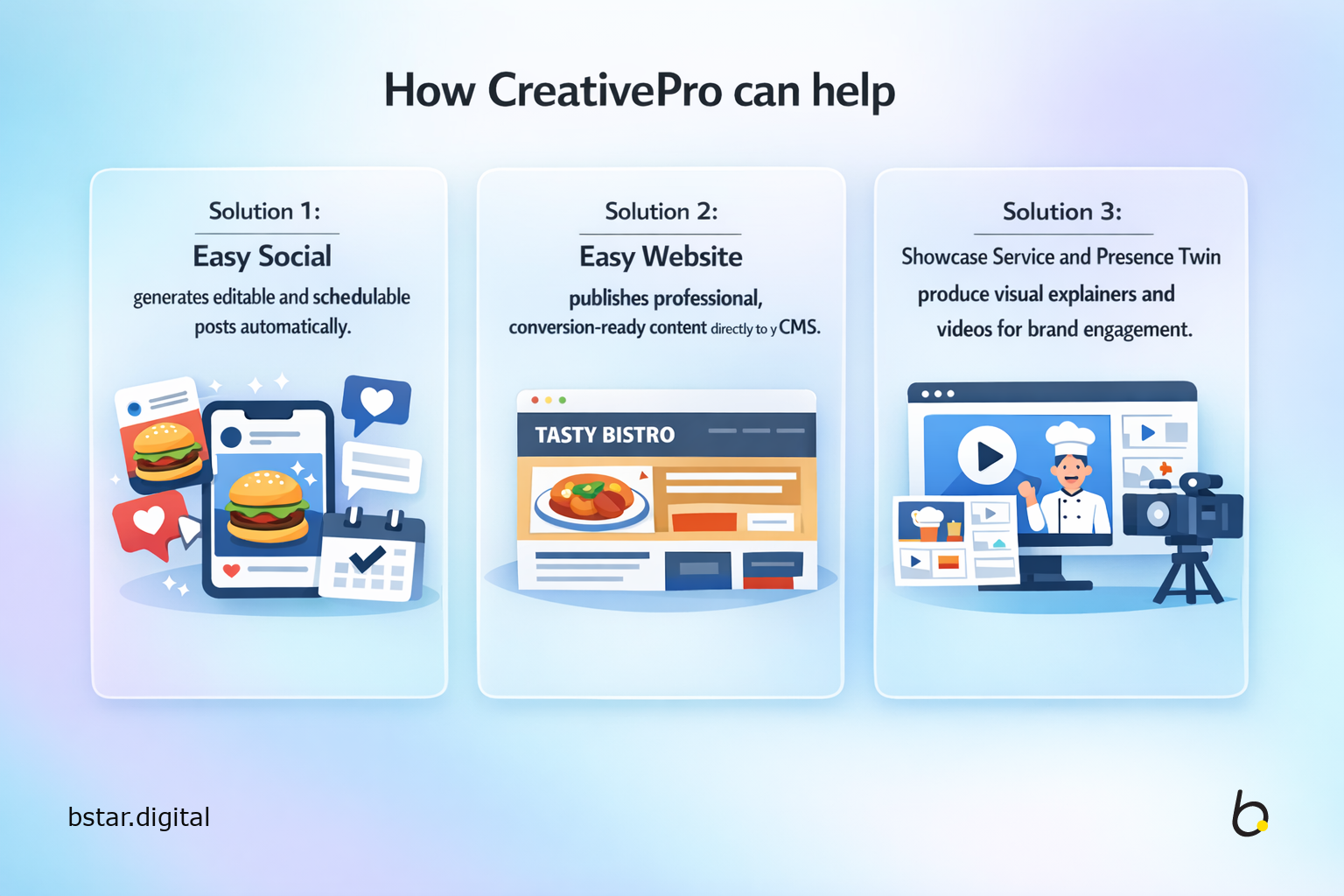
Prepare branded social content, channel-ready captions, scheduling, and publishing from one connected flow.
Service Explainers
Turn complex services, processes, and offers into clear visual stories and presentation assets.
One creative pipeline. Multiple ways to create.
Choose the flow that matches your objective. Each flow can use MarketPulse Pro intelligence, your bstarAI Store, and the direction in your Smart Doc to produce consistent, brand-aware results.

Easy Social
Create channel-ready posts, captions, hashtags, and visual media, then prepare them for review, scheduling, and publishing.
Connected Intelligence
Easy Social combines current market signals with your bstarAI Store and Smart Doc to create platform-aware content aligned with your brand and campaign intent.
Review & Publishing
- — Send approved content into bstarPublisher for scheduling and multi-channel publishing.
- — Use the default 24-hour review window to edit, approve, or reschedule before publication.
Best for: Businesses that want a consistent social presence without rebuilding every post manually.
Easy Website
Produce professional website and blog content without managing separate writing, formatting, image creation, and CMS preparation tasks.
Content Production
Select the content format and provide direction through your Smart Doc. CreativePro uses MarketPulse intelligence and your bstarAI Store to prepare structured, branded content and supporting media.
CMS Drafting
- — Prepare drafts for WordPress, Ghost, Joomla, bstarSites, and bstarShop.
- — Review and edit website content before it is published.
Best for: Businesses that need consistent, intelligence-led website and blog content.

Showcase Products
Transform source product photos into coordinated marketing images, videos, captions, and campaign-ready visual collections.
Creative Direction
Upload your authorized product media and describe the desired scene, environment, mood, or campaign direction in your Smart Doc.
Campaign Assets
- — Create coordinated image and video assets for product campaigns.
- — Prepare matching captions and publishing drafts for selected channels.
Best for: Ecommerce businesses, retailers, and product brands that need repeatable campaign media.
Showcase Services
Turn services, methods, offers, and complex processes into visual explainers, infographic collections, carousels, and presentation assets.
Business-Aware Creation
CreativePro uses your bstarAI Store and Smart Doc to structure the message, select the visual approach, and keep the output aligned with your brand.
Multi-Format Delivery
- — Prepare visual collections for social posts, carousels, and presentations.
- — Generate channel-ready captions and drafts for review.
Best for: Agencies, consultants, and service businesses that need to explain value clearly.
Presence Twin
Create presenter-led videos using your approved appearance and configured voice, without repeating a traditional filming process for every scene.
Authorized Media
Presence Twin is built only from appearance, voice, and media assets you provide or are authorized to use.
Scene Production
- — Prepare scripts and multiple branded scenes from one workflow.
- — Add configured voice, background music, and ambient audio where selected.
Best for: Founders, educators, creators, and experts who need repeatable presenter content.
Presence DuoCast
Coming SoonCreate structured two-person digital conversations, interview formats, podcast scenes, and studio-style video interactions.
In Development
DuoCast is being developed for businesses and creators that want structured conversational video without coordinating a traditional studio production.
Currently in Development
Connected Publishing
Move content from creation to review, scheduling, and publishing through bstarPublisher and supported website or blog integrations.
Social Publishing
Website & Blog Destinations
- WordPress Supported
- Ghost Supported
- Joomla Supported
- bstarSites Supported
- bstarShop Supported
Creation, Review & Publishing Connected
Professional creative workspaces for how you operate.
Use specialized image and video hubs designed around the practical media needs of online businesses, local brands, solopreneurs, and startups.
Online Businesses
Create product photography, campaign imagery, ecommerce video, and visual assets for online shops, marketplaces, and direct-to-customer brands.
Local Businesses
Produce location-aware imagery, service visuals, interior scenes, community content, and social media assets that support local visibility and trust.
Solopreneurs
Build a professional personal brand with approved portraits, presenter scenes, short-form videos, social assets, and portfolio-ready media.
Startups
Prepare launch visuals, product concepts, pitch-supporting media, explainers, demos, and campaign assets as your startup moves from idea to market.
What powers professional content at scale?
CreativePro performs best when strategy, business knowledge, and creative direction are connected before production begins.
MarketPulse Intelligence
StartPro MarketPulse supplies market demand, audience signals, search intent, competitive context, and emerging opportunities so your content is grounded in more than a generic prompt.
Your bstarAI Store
Your bstarAI Store acts as the approved source for brand information, products, services, offers, assets, expertise, and business knowledge used across CreativePro flows.
Your Smart Doc
Your Smart Doc defines the purpose, context, creative direction, scenarios, tone, and instructions for the flow. Update it when your campaign direction changes.
When everything connects
You are no longer creating isolated assets. You are operating a reusable content system in which intelligence, business knowledge, instructions, production, review, and publishing work together.
From Blueprint to your first publishing drafts.
Your Business OS deployment creates the initial intelligence foundation and prepares your first social and website content for review.


STEP 01
Get Your Business OS Blueprint
Enter your website and business email. We review your public business footprint and identify practical opportunities across positioning, visibility, content, leads, customer care, workflows, and operating control.
Your Starting Point
- • Review your current public presence
- • Identify content and growth opportunities
- • Choose self-deployment or guided setup
STEP 02
Deploy Your Business OS
When your personalized Business OS is deployed, the system creates your initial intelligence foundation, generates your first social posts and website blog content, and inserts the drafts into bstarPublisher for review.
Ready for Review
- • Initial social content drafts
- • Initial website blog draft
- • bstarPublisher review and scheduling
- • Shared context for future CreativePro flows
Commonly asked questions
Everything you need to know about CreativePro creation, review, publishing, integrations, and usage-based credits.
Yes. CreativePro access is included with bstarOne Pro. There is no additional CreativePro subscription or monthly retainer. You use bstarCredits only when you run usage-based content, media-generation, publishing, or supported automation actions.
Deployment creates your initial intelligence foundation and activates shared business context across the SmartPro solutions. CreativePro then generates your first social posts and website blog content and inserts them into bstarPublisher as drafts for review.
CreativePro combines StartPro MarketPulse intelligence, the approved business knowledge and assets in your bstarAI Store, and the direction in your Smart Doc. This allows the system to align content with your market, audience, brand, offer, and current creative objective.
When publishing is enabled, eligible social content is placed into bstarPublisher with a default 24-hour review window. During that time, you can inspect the media and captions, make edits, approve the content, change the schedule, or remove the draft before publication.
bstarPublisher supports LinkedIn, Instagram, TikTok, YouTube, X, Facebook, Threads, and Google Business. The exact format and publishing options available depend on the selected channel and connected account.
CreativePro supports content workflows for WordPress, Ghost, Joomla, bstarSites, and bstarShop. Website and blog content can be prepared as drafts so it can be reviewed and edited before publication.
Presence Twin uses appearance, voice, and media assets that you provide or are authorized to use. You define the scene and content direction, and the system can prepare scripts, configured voice output, rendered scenes, background music, and ambient audio based on the options you select.
Yes. The standard flows are designed to support a wide range of content needs. If your project requires custom workflows, specialist integrations, private endpoints, or a tailored production process, the bstarOne team can review the requirement as a separate expert service.
See what your content system could create and publish.
Enter your website and business email to receive a personalised bstarOne OS Blueprint. Discover practical opportunities across content, visibility, lead generation, customer care, workflows, reporting, and operating control.
No obligation. Review your Blueprint first, then choose self-deployment or guided setup.
Create
Content & Media
Review
Edit & Approve
Publish
Social & Web
bstarOne Smart Solutions for your business
The Integrated Business Operating System